
 Exceptions
# Exceptions
Example:
public class ExceptionsDemo {
  public static void show() {
      sayHello(null);
  }
  public static void sayHello(String name) {
      System.out.println(name.toUpperCase())
  }
}

public class Main {
    public static void main(String[] args) {
        ExceptionsDemo.show(); // will crash
    }
}
1
2
3
4
5
6
7
8
9
10
11
12
13
14
15
2
3
4
5
6
7
8
9
10
11
12
13
14
15
Result: null pointer exception

- It is a class declared Inside the java.lang pacakge
- An exception is an object that contains information about an error
- In the case above, this object is an instance of the null pointer exception
- It shows the
stack traceof an error- It shows the methods that have been called in the reverse order
- It helps when troubleshooting problems by locating the offending code
- The offending code throw an exception
# Exception Handler
- When error occurs, the Java Runtime looks for block of code in that method for handling that exception
- If we don't have any exception handling code, the Java runtime terminates the program and show the red exception information
- A good Java developer should prevent such exceptions from happening or anticipate and handle them properly
# Exception Types
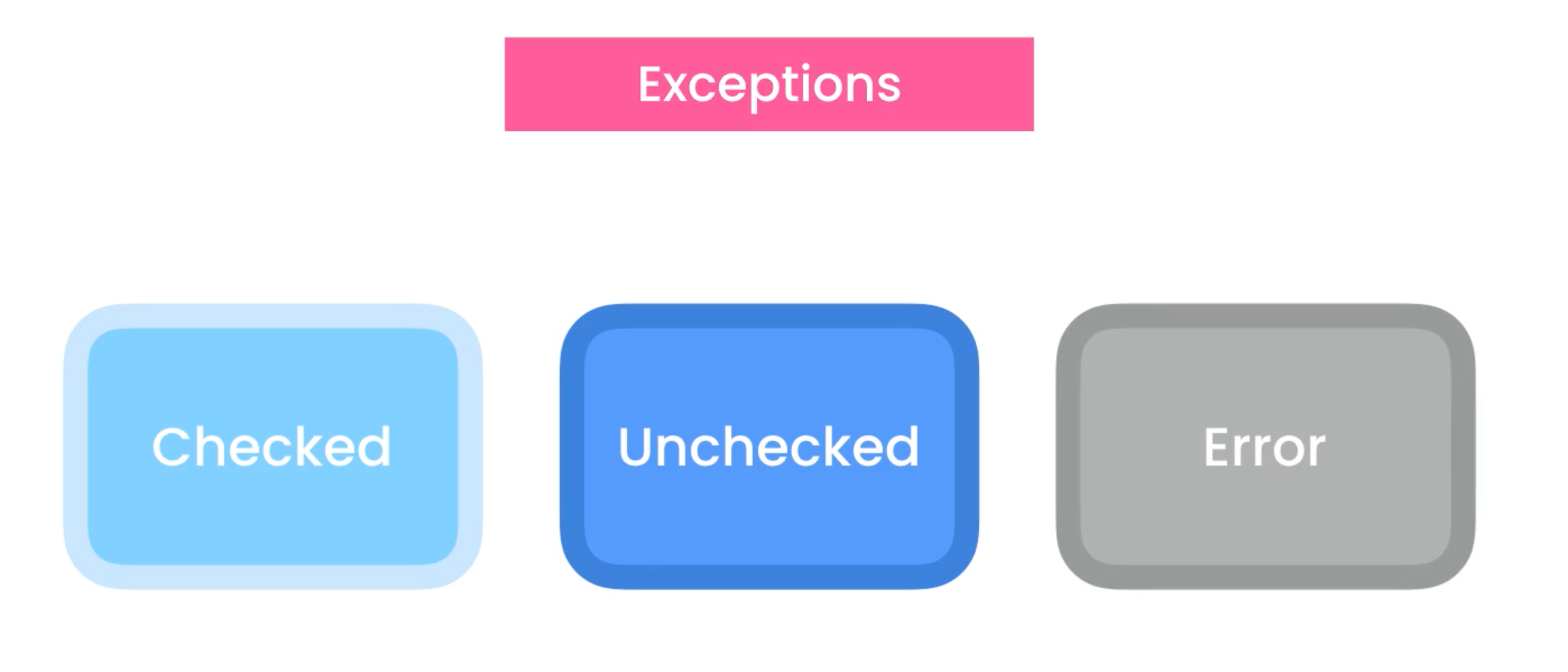
# Checked Exceptions
- They are the exceptions (edge cases) we should anticipate, recover from or handled properly
- Instead of letting the runtime terminate our program, we would better display a friendly message/reminder/warning to the user
- Java compiler enforces us to handle these errors
- That's why they called checked exceptions
- Because they get checked at compiled time
- e.g.

# Unchecked Exceptions (runtime exceptions)
- They are not checked by the compiler at compile time
- They occur because of program errors
- e.g.
NullPointerExceptionArithmeticException- Divide value by
0
- Divide value by
IllegalArgumentException- Arguments passed to a method is not accepted
IndexOutOfBoundsException- Use an invalid index to access an element in an array or a string
IllegalStateException- The underlying object is not in the right state when you call a method
- Instead of displaying a friendly message/reminder/warning, we should prevent them from happening in the first place
- Through testing
# Error
- It indicates an error external to our application
- e.g.
- Stack Overflow
- Out of Memory
- Java Virtual Machine runs out of memory
- Instead of displaying a friendly message/reminder/warning, we should try to identify the source of these errors
- These errors can happen because of
- programming errors
- Infinite loop (recursion)
- Reasons outside of our application
- A problem with the Java virtual machine itself
- programming errors
# Exception Hierarchy
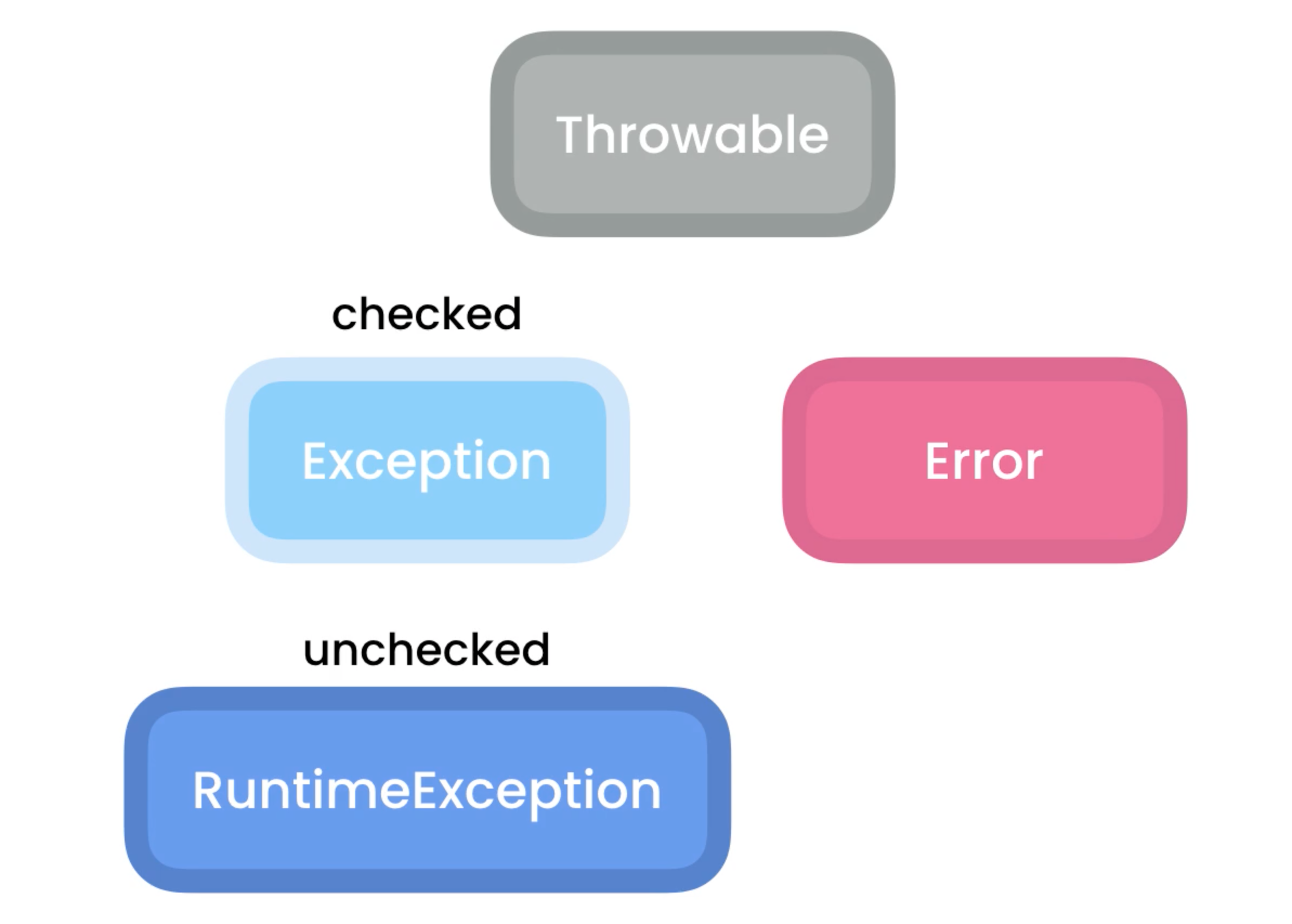
# Throwable class
- Defines the common characteristics for all exceptions and errors, like an error message and the stack trace
- Every kind of exception or error has an error message
# Exception
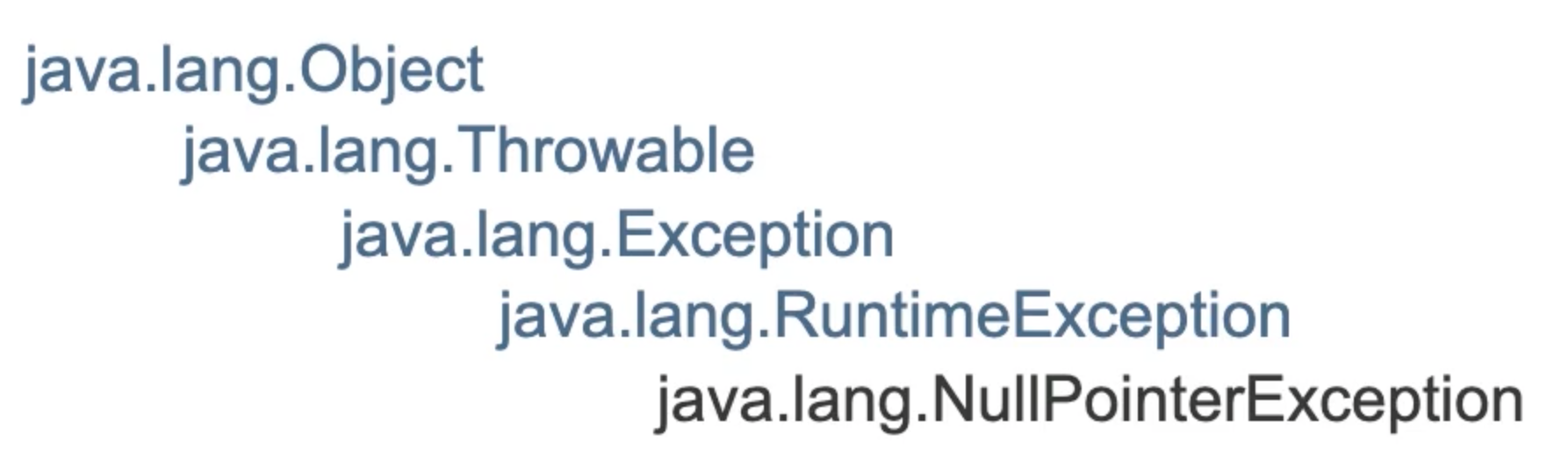
- Exception class is the parent for all checked and unchecked exceptions
# Error
- A subtype representing errors that are external to our application
- e.g. out of memory error
# Runtime Exception
- Represents runtime or unchecked exceptions
# Catching Exceptions
Proper way:
- IntelliJ will add it for us
public class ExceptionsDemo {
    public static void show() {
        try {
      		var reader = new FileReader("file.txt");
    		System.out.println("File opened");
    	} catch (FileNotFoundException ex) {
            System.out.println("File does not exist");
            // or
            System.out.println(ex.getMessage());
            // or
            e.printStackTrace();
    	}
        System.out.println("File opened"); // will still print
  	}
}
1
2
3
4
5
6
7
8
9
10
11
12
13
14
15
2
3
4
5
6
7
8
9
10
11
12
13
14
15
# Catching Multiple Types of Exceptions
public class ExceptionsDemo {
    public static void show() {
        try {
      		var reader = new FileReader("file.txt");
    		var value = reader.read();
    	} catch (FileNotFoundException ex) {
            e.printStackTrace();
    	} catch (IOExeption ex) {
            System.out.println("Could not read data");
		}
  	}
}
1
2
3
4
5
6
7
8
9
10
11
12
2
3
4
5
6
7
8
9
10
11
12
- Each block targets a specific exception
- Only one of the exception block will be executed
public class ExceptionsDemo {
    public static void show() {
        try {
      		var reader = new FileReader("file.txt");
    		var value = reader.read();
            new SimpleDateFormat().parse("");
    	} catch (IOException | ParseException e) {
            System.out.println("Could not read data");
		}
  	}
}
1
2
3
4
5
6
7
8
9
10
11
2
3
4
5
6
7
8
9
10
11
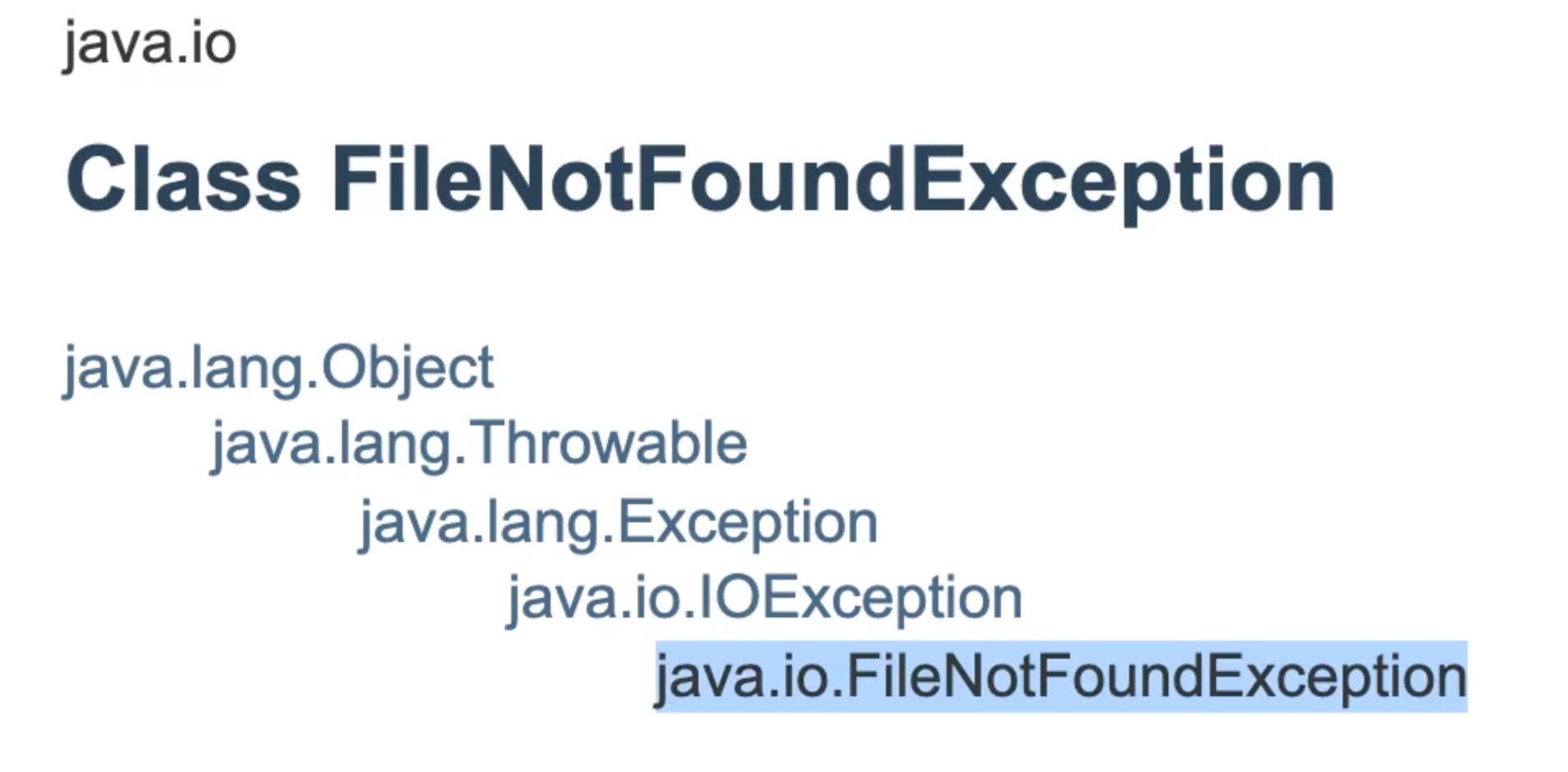
FileNotFoundExceptionderives fromIOException, so we can just useIOException(it can catch any of its derivatives)- Polymorphism
- Use
|to combine two exception block
# The Finally Block
public class ExceptionsDemo {
    public static void show() {
        try {
      		var reader = new FileReader("file.txt");
    		var value = reader.read();
            reader.close(); // if an exception is threw before this line,
            			    // 	the runtime will pass the control to the catch block
            				//	so this line will never get executed
    	} catch (IOExeption ex) {
            System.out.println("Could not read data");
		}
  	}
}
1
2
3
4
5
6
7
8
9
10
11
12
13
2
3
4
5
6
7
8
9
10
11
12
13
So the proper way is:
- Release external resources (file handles or database connections) in the
finallyblock - Finally block will always get executed no matter what
public class ExceptionsDemo {
    public static void show() {
        FileReader reader = null;	// declare reader here so it can be accessed in the finally block
        				   			// cannot use var here
        try {
      		reader = new FileReader("file.txt");
    		var value = reader.read();
    	} catch (IOExeption ex) {
            System.out.println("Could not read data");
		} finally {
            if (reader != null)
                try {
                	reader.close();
                } catch (IOException e) {
                    e.printStackTrace();
                }
        }
  	}
}
1
2
3
4
5
6
7
8
9
10
11
12
13
14
15
16
17
18
19
2
3
4
5
6
7
8
9
10
11
12
13
14
15
16
17
18
19
# The try-with-resources Statement
public class ExceptionsDemo {
    public static void show() {
        try (
            var reader = new FileReader("file.txt");
            var writer = new FileWriter("...");
        ) {
    		var value = reader.read();
    	} catch (IOExeption ex) {
            System.out.println("Could not read data");
		}
  	}
}
1
2
3
4
5
6
7
8
9
10
11
12
2
3
4
5
6
7
8
9
10
11
12
- Don't need to explicitly close this resources
- Java compiler will do that for us by
# Throwing Exceptions (Defensive Programming)
public class Account {
	public void deposit(float value)  {
    	if (value <= 0) // defensive programming
      		throw new IllegalArgumentException();
  	}
}

public class ExceptionsDemo {
	public static void show() {
    	var account = new Account();
        account.deposit(-1); // will crash
        account.deposit(1);	 // will not crash
	}
}
1
2
3
4
5
6
7
8
9
10
11
12
13
14
2
3
4
5
6
7
8
9
10
11
12
13
14
Although we should code in a defensive manner, we should not pollute every single method with data validation logic (have some level of trust)
Performe input validation only when you receive input from the user or external systems
- At the boundary of your application, not within the application itself
public class Account {
	public void deposit(float value) throws IOException  { // indicate that it may throw an IOException
    	if (value <= 0)
      	throw new IOException(); // defensive programming
  	}
}

public class ExceptionsDemo {
	public static void show() {
    	var account = new Account();
        try {
            account.deposit(1);
        } catch (IOException e) {
            e.printStackTrace();
        }
	}
}
1
2
3
4
5
6
7
8
9
10
11
12
13
14
15
16
17
2
3
4
5
6
7
8
9
10
11
12
13
14
15
16
17
# Re-throwing Exceptions
Why re-throwing?
- We want to log exceptions somewhere (stored in a file/database) so that we can come back and see what errors we had in our application
public class Account {
	public void deposit(float value) throws IOException  { // indicate that it may throw an IOException
    	if (value <= 0)
      		throw new IOException(); // defensive programming
  	}
}

public class ExceptionsDemo {
	public static void show() throws IOException { // indicate exception type
    	var account = new Account();
        try {
            account.deposit(1);
        } catch (IOException e) {
            e.printStackTrace();
            throw e; // rethrowing exception
        }
	}
}

// rethrow the expection to main
public class Main {
    public static void main(String[] args) {
        try {
            ExceptionsDemo.show();
        } catch (Throwable e) { // more general expection type
           	System.out.println("An unexpected error occurred");
        }
    }
}
1
2
3
4
5
6
7
8
9
10
11
12
13
14
15
16
17
18
19
20
21
22
23
24
25
26
27
28
29
2
3
4
5
6
7
8
9
10
11
12
13
14
15
16
17
18
19
20
21
22
23
24
25
26
27
28
29
# Custom Exceptions
public class ExceptionsDemo {
  	public static void show() {
    	var account = new Account();
    	try {
      		account.withdraw(10);
    	} catch (InsufficientFundsException e) {
      		System.out.println(e.geMessage());
    	}
  	}
}

public class Account {
	private float balance;

  	public void deposit(float value) throws IOException {
    	if (value <= 0)
      		throw new IOException();
  	}

  	public void withdraw(float value) throws InsufficientFundsException {
    	if (value > balance)
      		throw new InsufficientFundsException(); // custom exception
  	}
}

// be aware of the 'Exception' suffix, two types:
// 		1. Checked -> Exception
// 		2. Unchecked (runtime) -> RuntimeException

public class InsufficientFundsException extends Exception {
  	public InsufficientFundsException() {
    	super("Insufficient funds in your account.");
  	}

  	public InsufficientFundsException(String message) {
    	super(message);
  	}
}
1
2
3
4
5
6
7
8
9
10
11
12
13
14
15
16
17
18
19
20
21
22
23
24
25
26
27
28
29
30
31
32
33
34
35
36
37
38
2
3
4
5
6
7
8
9
10
11
12
13
14
15
16
17
18
19
20
21
22
23
24
25
26
27
28
29
30
31
32
33
34
35
36
37
38
IllegalArgumentExceptionis not used because this is not a programming error/mistake- This is an exceptional event that we should anticipate and recover from
# Chaining Exception
- Chaining exceptions means wrapping an exception inside a more general exception
- It is used in building libraries or frameworks
public class ExceptionsDemo {
  	public static void show() {
    	var account = new Account();
    	try {
      		account.withdraw(10);
    	} catch (AccountException e) {
      		var cause = e.getCause();
      		System.out.println(cause.getMessage());
    	}
  	}
}

public class Account {
	private float balance;

  	public void deposit(float value) throws IOException {
    	if (value <= 0)
      	throw new IOException();
  	}

  	public void withdraw(float value) throws AccountException {
    	if (value > balance)
      		throw new AccountException(new InsufficientFundsException());
  	}
}

public class AccountException extends Exception {
    // construction of this class is overloaded
  	public AccountException(Exception cause) {
    	super(cause);
  	}
}

public class InsufficientFundsException extends Exception {
  	public InsufficientFundsException() {
    	super("Insufficient funds in your account.");
  	}

  	public InsufficientFundsException(String message) {
    	super(message);
  	}
}
1
2
3
4
5
6
7
8
9
10
11
12
13
14
15
16
17
18
19
20
21
22
23
24
25
26
27
28
29
30
31
32
33
34
35
36
37
38
39
40
41
42
2
3
4
5
6
7
8
9
10
11
12
13
14
15
16
17
18
19
20
21
22
23
24
25
26
27
28
29
30
31
32
33
34
35
36
37
38
39
40
41
42
上次更新: 2022/01/09, 17:57:30