
 Collections
# Overview of Collections Framework
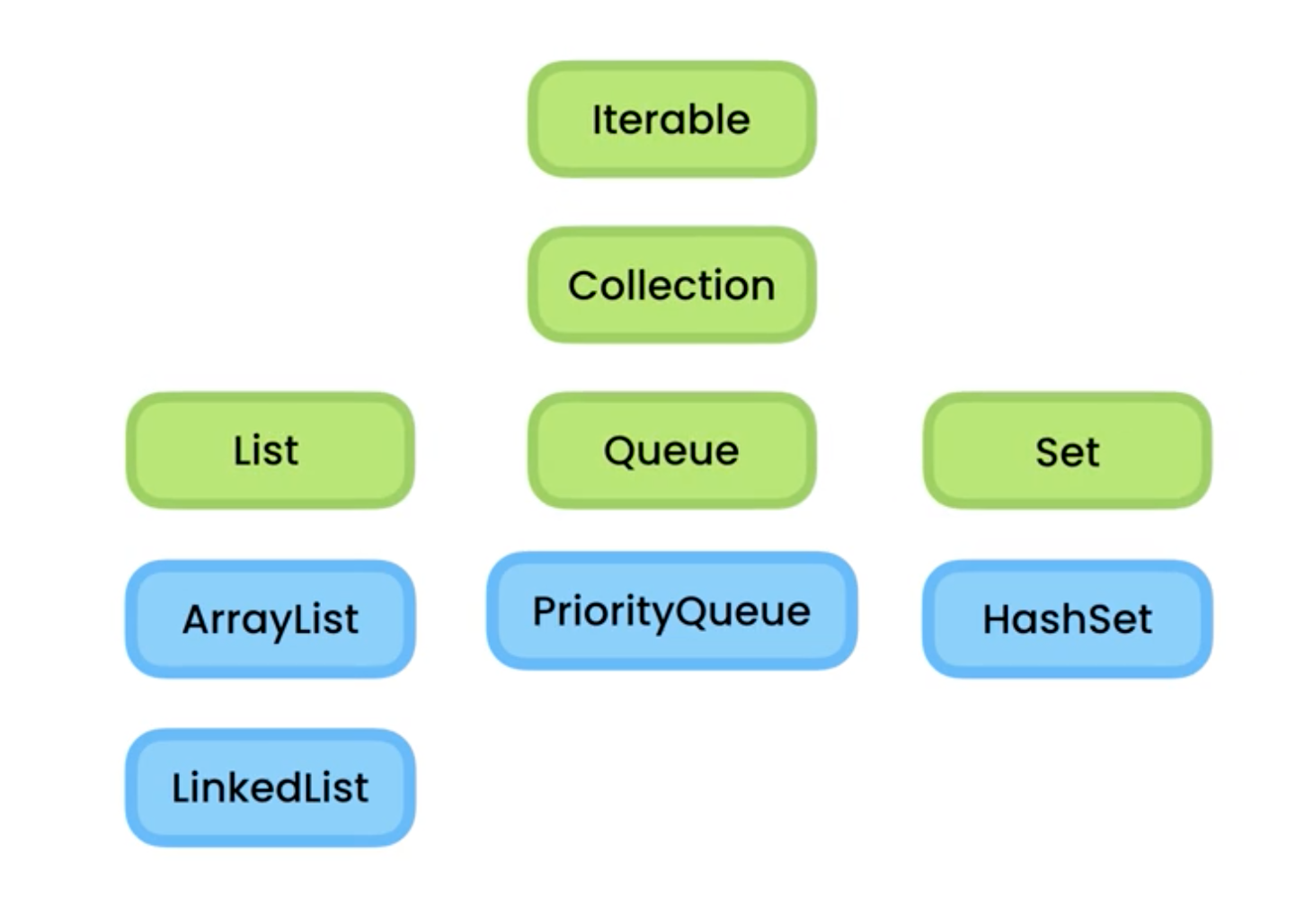
- Green boxes are interfaces
- Blue boxes are classes that implement those interfaces
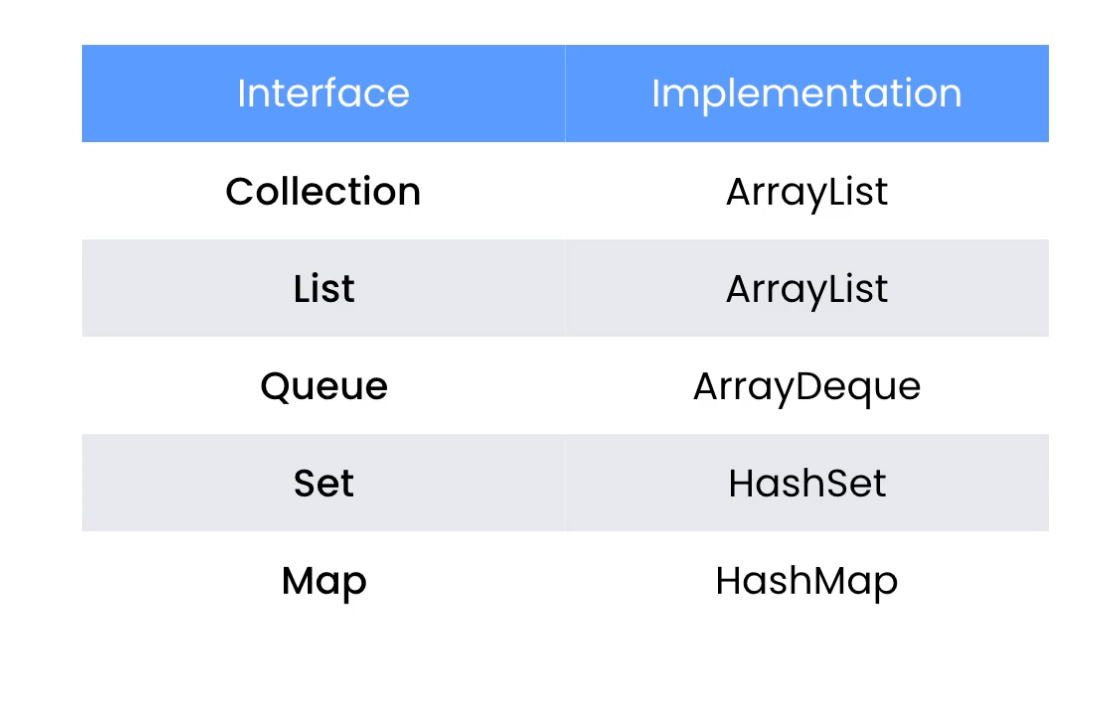
- Collection: represent a collection of objects to support (add/remove/get) operations
- In a collection we cannot access elements by their index
- List: extends the collection interface and gives us that additional functionality
- Queue: represent a queue of objects
- Process jobs in the order we receive them
- Set: represents a unique list of values
- Map: represents a set of key-value pairs
# The Need for Iterables
public class Main {
    public static void main(String[] args) {
        var list = new GenerticList<String>();
        list.add("a");
        list.add("b");
        for (var item : list.items)
            System.out.println(item);
        list.items[0] = "a";
        System.out.println(list.item.length);
    }
}

public class GenericList<T> implements Iterable<T> {
    // make it public
  	public T[] items = (T[]) new Object[10];
}
1
2
3
4
5
6
7
8
9
10
11
12
13
14
15
16
17
2
3
4
5
6
7
8
9
10
11
12
13
14
15
16
17
- However, by making
itemspublic, the main class and GenericList classes has unnecessary coupling - This makes future maintenance and upgrades very hard
- For example, if we replace
T[]withArrayList<T>, then the code in line 8 and nine will have compilation error
# The Iterable Interface
- This interface represents an object that is iterable and can be used in a
for eachstatement - We can iterate or loop over it without knowing anything about its implementation detail
- Don't care about its data structure
public class Main {
    public static void main(String[] args) {
        var list = new GenerticList<String>();
		var iterator = list.iterator();
        while (iterator.hasNext()) {
   			var current = iterator.next(); // return current object
            System.out.println(current);
        }

        // or simply
        for (String item : list)
            System.out.println(item);
        // because the `for-each loop` is a syntactical sugar
        //  over the iterator object
        // Java will convert our code to use an iterator object
    }
}

public class GenericList<T> implements Iteraable<T> {
    @Override
    public Iterator<T> iterator() {

    }
}
1
2
3
4
5
6
7
8
9
10
11
12
13
14
15
16
17
18
19
20
21
22
23
24
25
2
3
4
5
6
7
8
9
10
11
12
13
14
15
16
17
18
19
20
21
22
23
24
25
# The Iterator Interface
- An iterator is an object that we use to iterate over an iterable
public class GenericList<T> implements Iteraable<T> {
    @Override
    public Iterator<T> iterator() {
        return new ListIterator(this);
    }

    privat class ListIterator implements Iterator<T> {
        private GenericList<T> list;
    	private int index;

        // Constructor
        public ListIterator(GenericList<T> list) {
      		this.list = list;
    }

   		@Override
    	public boolean hasNext() {
      		return (index < list.count);
    	}

    	@Override
    	public T next() {
      		return list.items[index++];
    	}
    }
}

public class Main {
    public static void main(String[] args) {
        var list = new GenerticList<String>();
        list.add("a");
        list.add("b");
        for (String item : list)
            System.out.println(item);
    }
}
1
2
3
4
5
6
7
8
9
10
11
12
13
14
15
16
17
18
19
20
21
22
23
24
25
26
27
28
29
30
31
32
33
34
35
36
37
38
39
2
3
4
5
6
7
8
9
10
11
12
13
14
15
16
17
18
19
20
21
22
23
24
25
26
27
28
29
30
31
32
33
34
35
36
37
38
39
- We need to implement this iterator as a private nested class inside this generator list class
# The Collection Interface
- This interface extends the iterable interface and add additional functionality
- Therefore, elements in the collection are iterable
- It represents an object that can act like a container or a collection of objects
- The operations that the collection interface declares
- Add/remove an object
- Check for the existence of an object
- ...
// it is a generic interface
interface Collection<E>
1
2
2
Estands for element- This is a convention for collection semantic, because the collection can have multiple elements
public class CollectionDemo {
	public static void show() {
    	Collection<String> collection = new ArrayList<>();
    	collection.add("a");
    	collection.add("b");
    	collection.add("c");

    	// Add multiple items in one go
    	Collections.addAll(collection, "a", "b", "c");

    	var size = collection.size();

    	collection.remove("a");

    	var containsA = collection.contains("a");

    	collection.clear();

    	var isEmpty = collection.isEmpty();

        // default object array
    	Object[] objectArray = collection.toArray();

        // convert to string array
    	String[] stringArray = collection.toArray(new String[0]);

    	Collection<String> other = new ArrayList<>();
    	other.addAll(collection);
    	System.out.println(collection == other); // false, two different object in memory
    	System.out.println(collection.equals(other)); // true
  	}
}
1
2
3
4
5
6
7
8
9
10
11
12
13
14
15
16
17
18
19
20
21
22
23
24
25
26
27
28
29
30
31
32
2
3
4
5
6
7
8
9
10
11
12
13
14
15
16
17
18
19
20
21
22
23
24
25
26
27
28
29
30
31
32
# The List Interface
- It allows us to work with an ordered collection and access objects using the index
- One of the class that will be using most of the time is the ArrayList class, which is the implementation of a dynamic array
- It uses an array to store objects
- If the array gets full, it will automatically resize the array
- LinkedList
- Based on the linked list data structure
public class ListDemo {
  	public static void show() {
    	List<String> list = new ArrayList<>();
    	list.add("a");
    	list.add("b");
    	list.add("c");

    	// Add an item at a given index
    	list.add(0, "!");

        // We can add multiple items in one go
        Collections.addAll(list, "a", "b", "c");

        // get and set
        var first = list.get(0);
        list.set(0, "!!");

        // delete
        list.remove(0);

        // search
        var index = list.indexOf("a");
        var lastIndex = list.lastIndexOf("a");

        // section | return a new list
        System.out.println(list.subList(0, 2));
    }
}
1
2
3
4
5
6
7
8
9
10
11
12
13
14
15
16
17
18
19
20
21
22
23
24
25
26
27
28
29
2
3
4
5
6
7
8
9
10
11
12
13
14
15
16
17
18
19
20
21
22
23
24
25
26
27
28
29
# The Comparable Interface
- This is not flexible because it only compares objects by their names
public class Main {
    public static void main(String[] args) {
        List<Customer> customers = new ArrayList<>();
        customers.add(new Customer("b"));
        customers.add(new Customer("a"));
        customers.add(new Customer("c"));

        Collections.sort(customers);
    }
}

public class Customer implements Comparable<Customer> {
	private String name;
    private String email;

    public Customer(String name, String email) {
        this.name = name;
        this.email = email;
    }

    @Override
    public int compareTo(Customer other) {
        return name.compareTo(other.name);
    }

    @Override
    public String toString() {
        return name;
    }
}
1
2
3
4
5
6
7
8
9
10
11
12
13
14
15
16
17
18
19
20
21
22
23
24
25
26
27
28
29
30
2
3
4
5
6
7
8
9
10
11
12
13
14
15
16
17
18
19
20
21
22
23
24
25
26
27
28
29
30
# The Comparator Interface
public class Main {
    public static void main(String[] args) {
        List<Customer> customers = new ArrayList<>();
        customers.add(new Customer("b", "e3"));
        customers.add(new Customer("a", "e2"));
        customers.add(new Customer("c", "e1"));

        Collections.sort(customers, new EmailComparator()); // specify the comparator
    }
}

// use a new comparator to change comparison logic more easily
public class EmailComparator implements Comparator<Customer> {
    @Override
    public int compare(Customer o1, Customer o2) {
        return o1.getEmail().compareTo(o2.getEmail());
    }
}
1
2
3
4
5
6
7
8
9
10
11
12
13
14
15
16
17
18
2
3
4
5
6
7
8
9
10
11
12
13
14
15
16
17
18
# The Queue Interface
It provides additional operations for working with a queue of objects
It is used in situations where we have a resources that can be shared amongst many consumers
e.g.
- Printer of the office
- It takes the job one by one and process them
ArrayDeque
- Double ended queue
- Two ends
- Items can enter the tube from either end
PriorityQueue
- Each item gets an priority
- Priority determines the position of the item
- Items with a higher priority are moved to the front
public class QueueDemo {
    public static void show() {
        Queue<String> queue = new ArrayDeque<>();
        queue.add("c");
        queue.add("a");
        queue.add("b");
        queue.offer("d"); // diff: most of the time the same
        // for ArrayDeque with limited size, `add` throws an exeception,
        // 	`offer` returns false

        // move the element in the front and return it
        var front = queue.remove(); // the same as queue.poll()
        // poll() will return null if the queue is empty

        front = queue.element(); // the same as queue.peek()

        System.out.println(front);
        System.out.println(queue);

        // We have alternative methods that don't
        // throw an exception:

        // offer() similar to add()
        // poll() similar to remove()
        // peek() similar to element()
    }
}
1
2
3
4
5
6
7
8
9
10
11
12
13
14
15
16
17
18
19
20
21
22
23
24
25
26
27
2
3
4
5
6
7
8
9
10
11
12
13
14
15
16
17
18
19
20
21
22
23
24
25
26
27
# The Set Interface
- It represents a collection without duplications
- It is a great way of storing a list of unique values
- The Set interface does not guarantee the order of elements, it only guarantee the uniqueness
public class SetDemo {
    public static void show() {
        Set<String> set1 =
            new HashSet<>(Arrays.asList("a", "b", "c"));

        Set<String> set2 =
            new HashSet<>(Arrays.asList("b", "c", "d"));

        // Union
        set1.addAll(set2);

        // Intersection
        set1.retainAll(set2);

        // Difference
        set1.removeAll(set2);

        // remove duplicates in the collection
        Collection<String> collection = new ArrayList<>();
        Collections.addAll(collection, "a", "b", "c", "c");
        Set<String> set = new HashSet<>(collection);
        System.out.println(set); // [a, b, c]
    }
}
1
2
3
4
5
6
7
8
9
10
11
12
13
14
15
16
17
18
19
20
21
22
23
24
2
3
4
5
6
7
8
9
10
11
12
13
14
15
16
17
18
19
20
21
22
23
24
# The Map Interface
public class MapDemo {
    public static void show() {
        var c1 = new Customer("a", "e1");
        var c2 = new Customer("b", "e2");

        Map<String, Customer> map = new HashMap<>();
        map.put(c1.getEmail(), c1);
        map.put(c2.getEmail(), c2);

        var exists = map.containsKey("e1");

        var unknown = new Customer("Unknown", "");
        var customer = map.get("e1");
        customer = map.getOrDefault("e1", unknown);

        map.replace("e1", new Customer("a++", "e1"));

        for (var key : map.keySet())
            System.out.println(key);

        for (var value : map.values())
            System.out.println(value);

        for (var entry : map.entrySet())
            System.out.println(entry); // print 'key=value'

    }
}
1
2
3
4
5
6
7
8
9
10
11
12
13
14
15
16
17
18
19
20
21
22
23
24
25
26
27
28
2
3
4
5
6
7
8
9
10
11
12
13
14
15
16
17
18
19
20
21
22
23
24
25
26
27
28
上次更新: 2022/12/04, 16:55:22